Basics Linux Commands

🚀 Passionate DevOps Engineer | AWS Enthusiast | Continuous Learner 🌟
👋 Hello! I'm Paresh Parde, a passionate and eager DevOps enthusiast ready to embark on a journey in the world of technology. With a solid foundation in both development and operations, I bring a fresh perspective and a hunger to learn and grow within the DevOps landscape.
Let's connect and explore how we can create impactful solutions together!🚀
Follow me on LinkedIn: https://www.linkedin.com/in/paresh-parde-544493232/
🐧What is Linux
Linux is an open-source, powerful and versatile operating system known for its command-line interface, which allows users to perform a wide range of tasks efficiency. Linux is available to users at no cost. An operating system is the software that directly manages a system's hardware and resources, like CPU, memory, and storage.
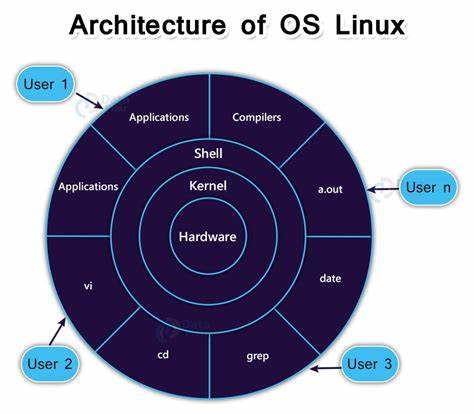
The main components of Linux operating system are:
Applications: Applications in the Linux architecture are software programs that run on top of the operating system and interact with its components.
Shell: In Linux, the shell is a command-line interface that allows users to interact with the system through a set of commands. The most popular shell in Linux is the Bash shell.
Kernel: The kernel is the central component of the Linux operating system architecture. It manages system resources and provides services to applications and processes running on the system.
Hardware: The lowest level of the Linux architecture is the hardware layer. This layer comprises the physical components of a computer, such as the hard drive, RAM, motherboard, CPU, network interfaces, and peripherals.
🐧Core Features of Linux
Open Source: Linux's source code is freely accessible, allowing users to modify, distribute, and contribute to its development.
Stability: Linux is renowned for its robustness and stability, with many distributions offering long-term support (LTS) releases.
Security: With a strong focus on security, Linux provides features like user permissions, access controls, and regular security updates to safeguard systems against threats.
Flexibility: Linux offers a high degree of customization, allowing users to tailor their operating environment to suit their specific needs and preferences.
Scalability: From embedded devices to enterprise servers, Linux scales effortlessly to accommodate diverse computing requirements.
🚀Basic Linux Commands
⚜️File Commands
ls option_flag arguments  #list the sub directories and files available in the present directory

ls -l                     #list the files and directories in long list format with extra information

ls -a                     #list all including hidden files and directory

ls *.sh                   #list all the files having .sh extension.

ls -i                     # list the files and directories with index numbers inodes

ls -d */                  # list only directories.(we can also specify a pattern
⚜️Directory commands
mkdir dirName             # make a new directory 'dirName'

mkdir .Newdir             # make a hidden directory (also . before a file to make it hidden)

mkdir A B C D             #make multiple directories at the same time

mkdir /home/user/Mydir    # make a new folder in a specific location

mkdir -p  A/B/C/D         # make a nested directory

pwd                        #This command will display the full path to the current directory.

cd path_to_directory      #change directory to the provided path

cd ~ or just cd           #change directory to the home directory

cd -                      # Go to the last working directory.

cd ..                     # change directory to one step back.

cd ../..                  # Change directory to 2 levels back.
🎇Conclusion
In short, Linux has a bunch of useful commands and tools to handle files and directories. The ones we covered here are just a starting point, and whether you're new to Linux or a pro, these commands will be super handy for your everyday tasks in Linux.
I'm confident that this blog will prove to be valuable, helping you discover new insights and learn something enriching. 🙏
😊Happy Learning : )